
Download NotebookLM – AI‑powered note‑taking & research assistant
Overview
NotebookLM is Google Labs’ experimental answer to the growing demand for intelligent note‑taking software. In an era where information overload is the norm, professionals, students, and creators struggle to turn raw data into meaningful insights. NotebookLM tackles this challenge by marrying Google’s advanced language‑model technology with the user’s own documents, turning a static collection of notes into a dynamic research companion.
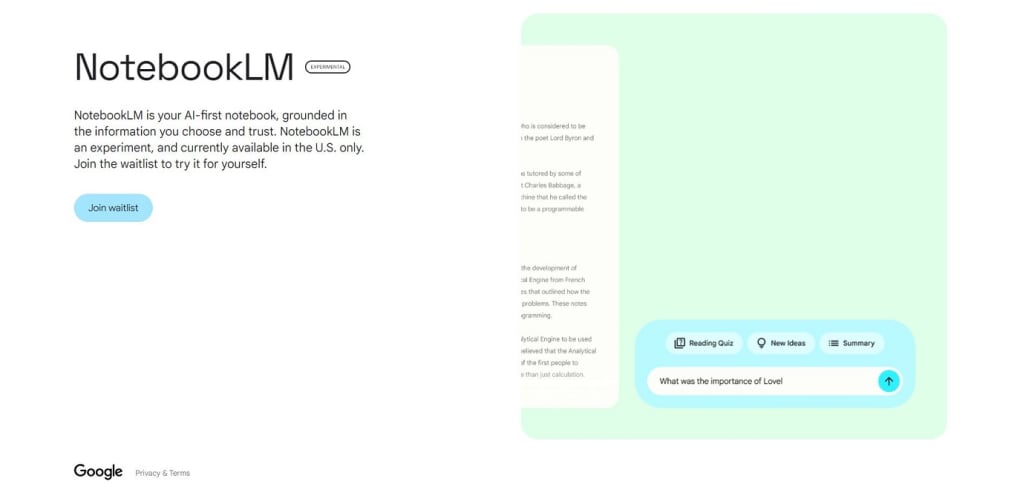
The platform works by “grounding” the AI in the content you upload—primarily Google Docs at launch—allowing it to generate summaries, surface hidden connections, and answer complex questions as if it were a personal tutor familiar with your work. This approach distinguishes NotebookLM from generic chatbots that rely solely on publicly available knowledge. Instead, it becomes a private, context‑aware assistant that respects the confidentiality of your material while delivering deep, customized analysis.
Whether you need a quick recap of a lengthy report, an explanation of a dense scientific concept, or a creative spark for a marketing campaign, NotebookLM aims to provide the right answer at the right time. As a free, cloud‑based tool, it also promises seamless updates and integration with the Google ecosystem, positioning itself as a future‑proof solution for anyone looking to boost productivity through AI‑driven insight generation.
Key Features & How NotebookLM Works
- AI‑Grounded Summaries: Upload a Google Doc and instantly receive a concise summary highlighting the main ideas, key facts, and emerging themes.
- Contextual Q&A: Ask follow‑up questions about the uploaded content and get answers that reference specific sections of your document.
- Idea‑Generation Engine: Leverage the model to brainstorm outlines, scripts, or business models tailored to the topics you’re researching.
- Topic Extraction & Tagging: The system automatically identifies core topics and suggests tags, making future retrieval easier.
- Dynamic Knowledge Map: Visual connections between concepts are created, helping you see relationships that may not be obvious in linear notes.
- Secure, Private Processing: All data remains within Google’s secure cloud environment, and the AI only accesses the documents you explicitly grant permission to.
- Future‑Ready File Support: While currently limited to Google Docs, the roadmap includes support for PDFs, Markdown, and other common formats.
How It Works – A Step‑by‑Step Walkthrough
When you first launch NotebookLM, you’re greeted with a clean dashboard that invites you to “Add a Notebook.” Clicking this button opens a Google authentication flow, after which you can select any Google Doc you own or have edit rights to. Once selected, the platform’s backend parses the document, extracts text, and feeds it into a specialized language model fine‑tuned for summarization and knowledge extraction. Within seconds, you receive a high‑level overview, a list of key topics, and a set of starter questions designed to deepen your engagement with the material. From there, you can type natural‑language queries—such as “Explain the impact of X on Y” or “What are the risks mentioned in section 4?”—and the AI will generate answers that cite specific paragraphs, preserving the context of the original source. This iterative loop encourages active learning and helps you build a richer, interconnected knowledge base without leaving the Google environment.
Installation, Usage Instructions & Compatibility
Getting Started – Quick Installation Guide
NotebookLM is a web‑based application, so there’s no traditional installer to download. To begin, follow these steps:
- Visit the official NotebookLM page on the Google Labs website.
- Click the “Get Started” button, which redirects you to a Google sign‑in screen.
- Sign in with the Google account you use for Docs; this grants the app permission to read your files.
- After authentication, you’ll land on the NotebookLM dashboard where you can add your first notebook.
- Select a Google Doc from the list presented, or paste a shareable link to a document you own.
- Allow a few seconds for the AI to process the content; you’ll then see the auto‑generated summary and topic list.
- Start asking questions in the chat‑like interface, or click “Brainstorm” to trigger idea‑generation modes.
Operating System & Browser Support
Because NotebookLM runs entirely in the browser, it is compatible with any modern operating system that supports Chrome, Edge, Firefox, or Safari. This includes:
- Windows 10/11
- macOS Monterey and later
- Linux distributions with a recent Chromium‑based browser
- Chrome OS (Chromebooks)
- Mobile browsers on Android 12+ and iOS 14+ (though the full feature set is optimized for desktop)
For the best experience, we recommend using Google Chrome or Microsoft Edge, as they provide the most seamless integration with Google’s authentication APIs and real‑time AI processing.
Best Practices for Effective Use
To maximize the value you get from NotebookLM, consider the following tips:
- Keep documents well‑structured: Use headings and bullet points so the AI can accurately parse sections.
- Limit file size: While there is no hard cap, documents under 50 pages process faster and yield clearer summaries.
- Use descriptive titles: The AI leverages document titles for topic extraction; clear titles improve relevance.
- Iterate with follow‑up questions: The more specific your query, the more precise the answer. Try “What does the author mean by ‘network effect’ in paragraph 3?”
- Secure your data: Regularly review the permissions you’ve granted in your Google Account settings.
Pros, Cons, Frequently Asked Questions & Final Verdict
Pros & Cons
- Pros
- AI‑driven summarization saves time on lengthy documents.
- Context‑aware Q&A provides precise, citation‑rich answers.
- Secure, Google‑based infrastructure protects user data.
- Free to use during the experimental phase.
- Future roadmap promises broader file‑type support.
- Cons
- Currently limited to Google Docs; other formats need workarounds.
- Performance may vary with extremely large or highly technical documents.
- As an experimental product, features are subject to change.
- Advanced brainstorming tools are still in beta and may produce generic ideas.
Frequently Asked Questions
Is NotebookLM completely free?
During the experimental phase, NotebookLM is offered at no cost. Google may introduce premium tiers in the future, but the core summarization and Q&A features will remain free for basic users.
Can I use NotebookLM on my mobile device?
Yes, the web app works on modern mobile browsers for Android and iOS. However, the full feature set, especially brainstorming mode, is optimized for desktop browsers.
How does NotebookLM protect my private documents?
All processing occurs within Google’s secure cloud environment. The AI only accesses files you explicitly grant permission to, and data is not shared with third parties. You can revoke access at any time via your Google Account settings.
What file formats will be supported in future updates?
Google has announced plans to add PDF, Markdown, and plain‑text support. Community feedback will help prioritize additional formats like PowerPoint and Excel.
Can NotebookLM be used for collaborative projects?
Yes. Because the tool works directly with Google Docs, any collaborator with edit access can upload the same document and benefit from the AI insights simultaneously.
Conclusion & Call to Action
NotebookLM represents a bold step toward integrating AI directly into the workflow of note‑taking and research. By grounding a powerful language model in your own documents, it transforms static text into an interactive knowledge base that can summarize, clarify, and inspire new ideas. While the current limitation to Google Docs may feel restrictive for some, the secure, cloud‑native architecture and clear roadmap for expanded file support suggest that NotebookLM will evolve into a versatile hub for personal and collaborative intelligence. If you’re looking for a free, secure tool that can cut down the time spent reading long reports and help you generate fresh concepts, NotebookLM is worth a try today.
Download NotebookLM now and experience AI‑enhanced note‑taking for yourself. Join the early‑access community, provide feedback, and help shape the future of intelligent research assistants.







